Every generated 3D model already carries a UV map, but it's often a patchwork of tiny islands that's awkward to edit. UV Unwrap re-lays the UVs into clean, coherent islands and re-bakes the model's existing textures onto the new layout — turning it into a UV sheet you (or an artist) can actually work with. In the app this tool is called Smart UV.
Reach for it when you plan to hand-edit textures in a DCC (Blender, Substance), or when a model's original UVs are too fragmented to paint on. UV Unwrap is available on paid plans.
How to unwrap
- Choose Smart UV in the left toolbar and set the model to unwrap with the Source Model card at the top of the panel. You can also choose Smart UV from a library card's menu (⋮) — on mobile, long-press a thumbnail and choose Smart UV.
- Pick an engine (see below).
- Press Unwrap UV. The credit cost is shown above the button.
The result is a model with the same shape on a fresh UV layout, and it keeps the source's name. In the asset info panel's step trail it shows up as Smart UV.
Engines
There are four engines, listed here in the order the picker shows them. Credit costs are as of October 2026.
- PB Unwrap (default) — PicoBerry's in-house engine. At 10 credits it's the lowest-cost option, and on most models it leaves almost no stray fragments (models with a great many small parts, like coins, are the exception). It also takes the widest range of models — anything with fewer than 100,000 faces. Start here.
- HY3 Unwrap — Tencent Hunyuan's unwrapper (120 credits). It tends to lay large surfaces such as a body out in one big piece, which makes the sheet easy to read, but it leaves many small fragments around them. On dense models with lots of detail, like scales or feathers, it breaks a large share of the mesh into tiny fragments. It only takes models with fewer than 30,000 faces, and jobs run one at a time, so you may wait longer when it's busy.
- Tripo Unwrap — Tripo's Smart UV engine (120 credits). It cuts large, clean islands and packs the texture space tightly, and it gave the best overall results in the comparison below. It held up on detailed models too. Takes models with fewer than 50,000 faces.
- Meshy Unwrap — Meshy's UV unwrapper (90 credits). It gives the most even texture resolution across the model. On models with many small parts, like foliage or ornaments, the number of stray fragments rises sharply. Takes models with fewer than 40,000 faces.
Tripo Unwrap and Meshy Unwrap run on each vendor's own servers, so they may take longer than usual when demand is high.
Choose a model with more faces than the engine allows and you'll see "This model has N faces…" with the button locked. Pick an engine with a higher limit, or press Go to Remesh to bring the face count down with Remesh, then unwrap again.
Engine comparison
We unwrapped six game assets made in PicoBerry with all four engines and compared the results (measured October 2026).
How we tested
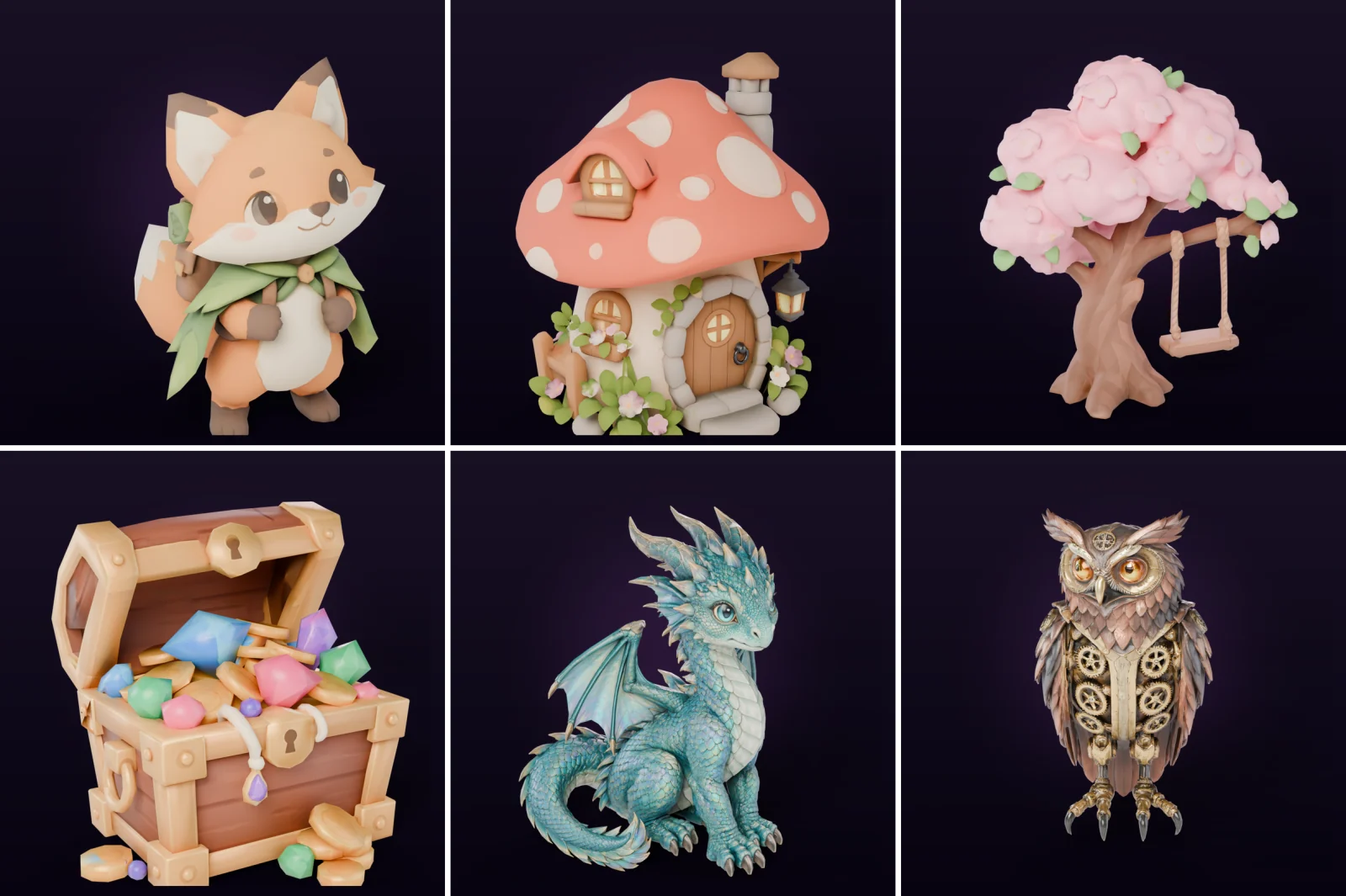
- Assets — Six 3D assets built in PicoBerry from concept image to model: four low-poly models of about 4,000–15,000 faces (a fox character, a mushroom cottage, a blossom tree, a treasure chest) and two models of about 25,000 faces with dense detail like scales and feathers (a baby dragon, a steampunk owl). Each was generated with a different engine: Tripo P1, Tripo P2, Meshy 6 - Low Poly, Meshy T2, Meshy 7, and Hunyuan 3.1.
- Method — We unwrapped each asset with all four engines and analyzed the UVs in the resulting files. PB and HY3 ran on the live picoberry.ai service; Tripo and Meshy ran with the same settings and the same post-processing as the service.
- Overall — All 24 jobs succeeded. Every result kept the original shape, position, and scale, and none came back with broken textures.
Metrics
| Metric | What it means | Better when |
|---|---|---|
| Islands | How many pieces the UVs are split into | Fewer |
| Major-surface islands | Islands needed to cover 90% of the surface area | Fewer (bigger chunks) |
| Fragment ratio | Share of faces in islands of only one or two faces | Lower |
| UV space usage | Share of the texture sheet actually used | Higher (sharper at the same resolution) |
| Texel density spread | How much texture resolution varies across the model (coefficient of variation) | Lower |
Summary
Metric values are medians across the six assets; bold marks the best value.
| Metric | PB | HY3 | Tripo | Meshy |
|---|---|---|---|---|
| Islands | 199 | 434 | 172 | 451 |
| Major-surface islands | 82 | 118 | 81 | 150 |
| Fragment ratio | 0.4% | 5.0% | 0.1% | 1.8% |
| UV space usage | 63% | 73% | 73% | 64% |
| Texel density spread | 0.16 | 0.19 | 0.13 | 0.06 |
| Credits | 10 | 120 | 120 | 90 |
A job typically takes about 2–4 min with PB Unwrap, 2–5 min with HY3 Unwrap, 2–4 min with Tripo Unwrap, and 3–7 min with Meshy Unwrap (from server records — HY3 from these six assets, the others from the separate test below).
- Tripo Unwrap was the cleanest overall. It had the fewest islands on every asset except the blossom tree, the highest UV space usage on every asset except the fox, and the lowest fragment ratio (or tied for it) on all six. It kept large islands even on the detailed dragon and owl.
- Meshy Unwrap gave the most even texture resolution — best on all six assets. But on the blossom tree, with its many blossoms and leaves, its island count climbed to 1,771, with about 11% of the faces scattered into tiny fragments.
- PB Unwrap, the lowest-cost engine, came second only to Tripo Unwrap on island count and fragment ratio, and had the fewest islands of all four on the blossom tree. Its UV space usage was on the low side.
- HY3 Unwrap sometimes laid large surfaces out in one big, easy-to-read piece (77% usage on the fox, the highest of the four), but it left many small fragments around them: on three of the four low-poly models it had the most islands and the highest fragment ratio of the four engines. It fell apart on the two detailed models. On the baby dragon, 66% of the faces became tiny fragments and only 14% of the sheet was used.
- A separate test on 10 other models, made with other generation engines, pointed the same way: Tripo Unwrap had the fewest islands on 7 of the 10 and the highest UV space usage on 9, and Meshy Unwrap had the most even texture resolution on 8. One exception: on a treasure chest model with many small coins, PB Unwrap had the highest fragment ratio of the four, at 15%.
Results by asset
Island count per asset. Bold marks the fewest.
| Asset (source engine · faces) | PB | HY3 | Tripo | Meshy |
|---|---|---|---|---|
| Fox character (Tripo P1 · 4,853) | 153 | 346 | 79 | 133 |
| Mushroom cottage (Tripo P2 · 3,998) | 158 | 248 | 147 | 209 |
| Treasure chest (Meshy T2 · 4,073) | 239 | 521 | 196 | 275 |
| Blossom tree (Meshy 6 - Low Poly · 15,407) | 113 | 318 | 141 | 1,771 |
| Baby dragon (Meshy 7 · 26,102) | 324 | 17,370 | 211 | 626 |
| Steampunk owl (Hunyuan 3.1 · 25,110) | 1,367 | 5,508 | 384 | 2,159 |
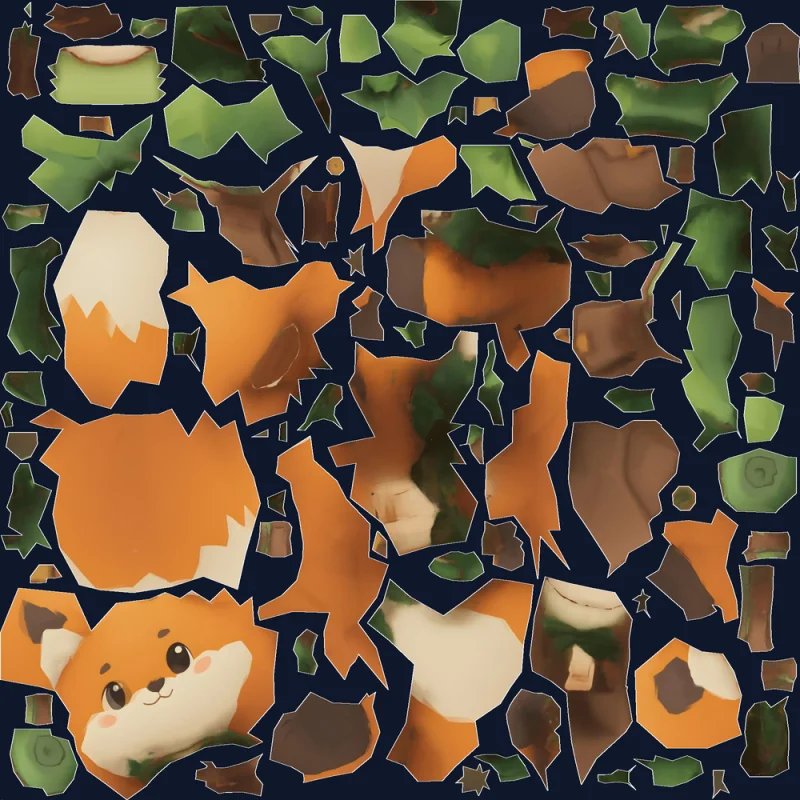
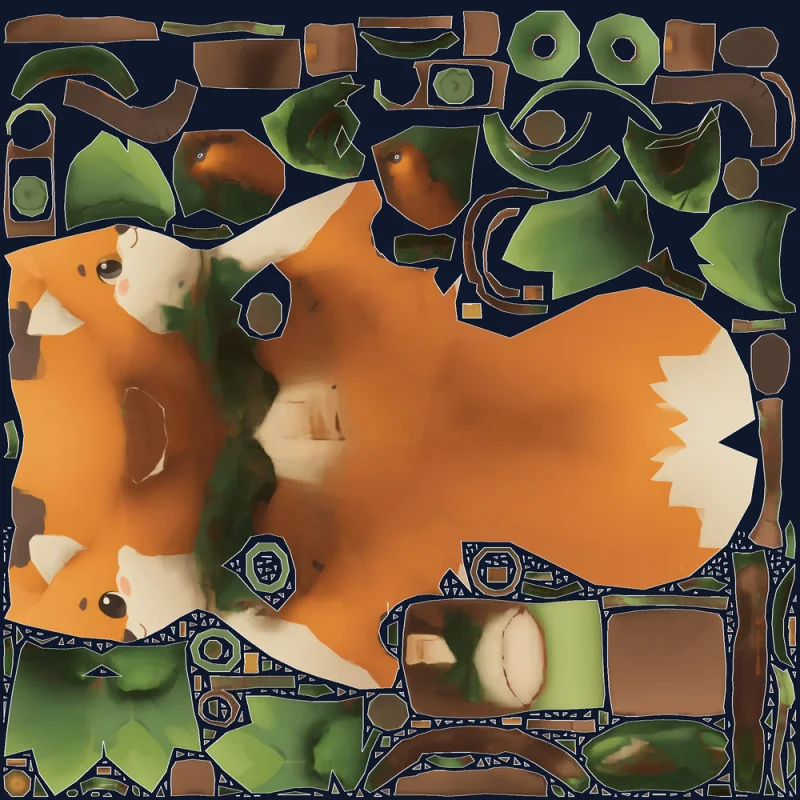
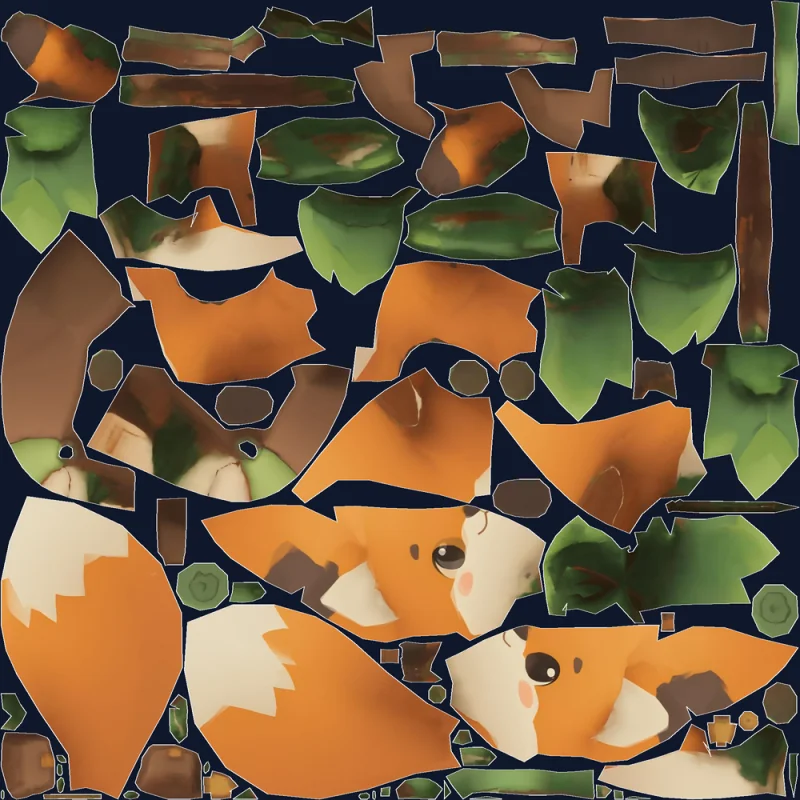
Inside each island of the UV sheets below is the actual texture, re-baked onto the new UVs.
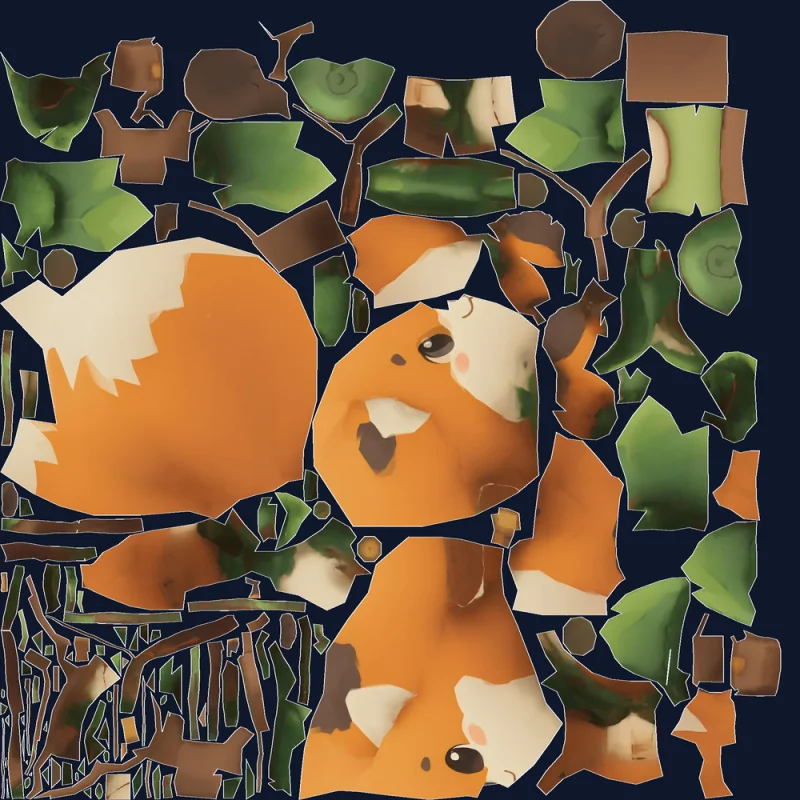
Fox character — All four engines produced usable layouts. Tripo Unwrap split it into the fewest islands (79), and HY3 Unwrap unfolded the front and back of the body into one piece — you can tell it's a fox just from the sheet (77% usage). Meshy Unwrap laid the body out in large pieces but cut a few parts into many thin strips, and PB Unwrap kept the face in one piece while splitting the body into several.
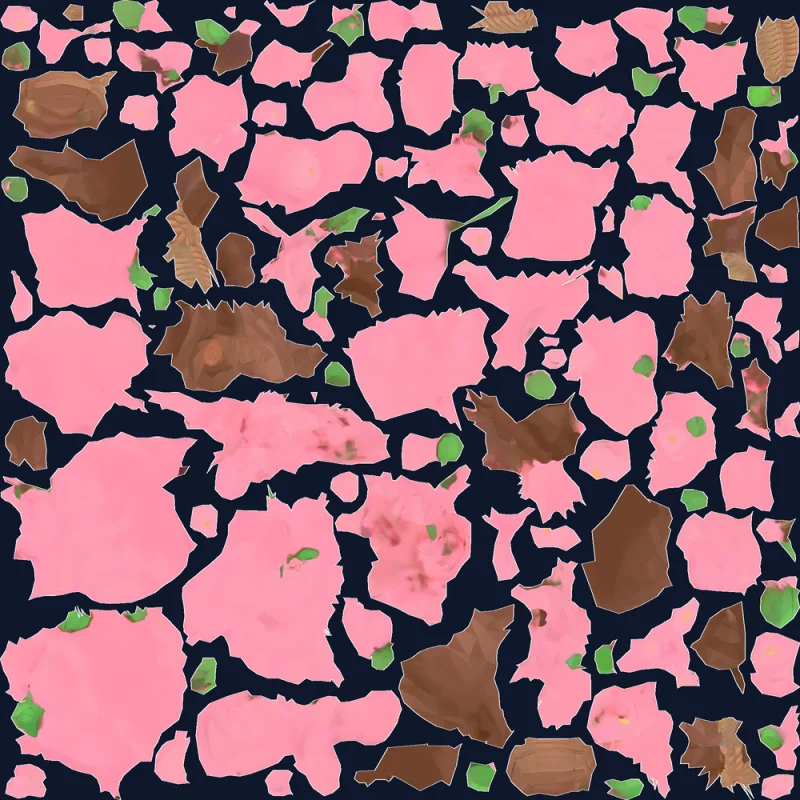
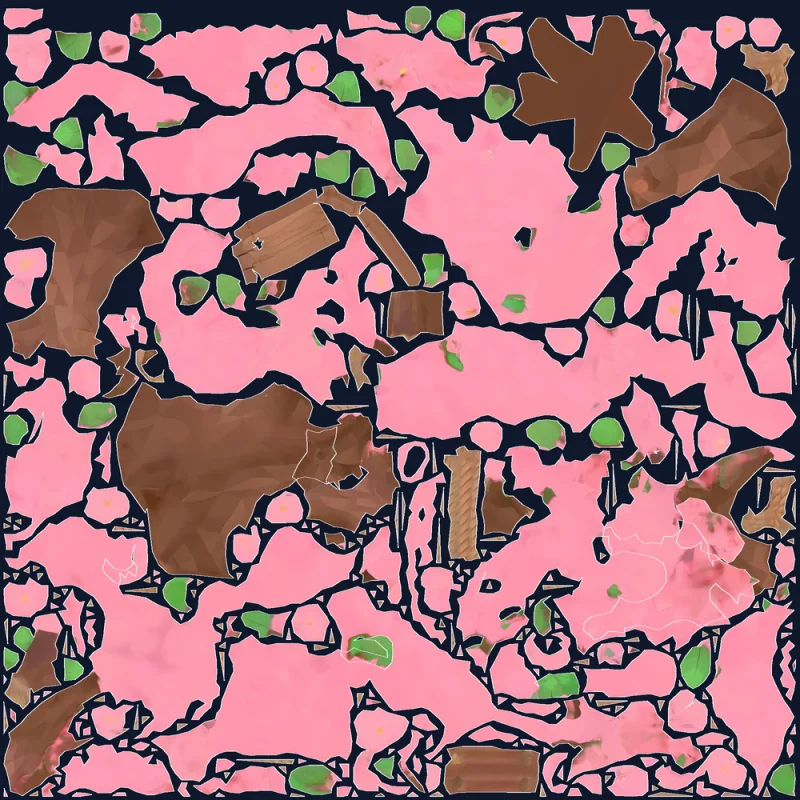
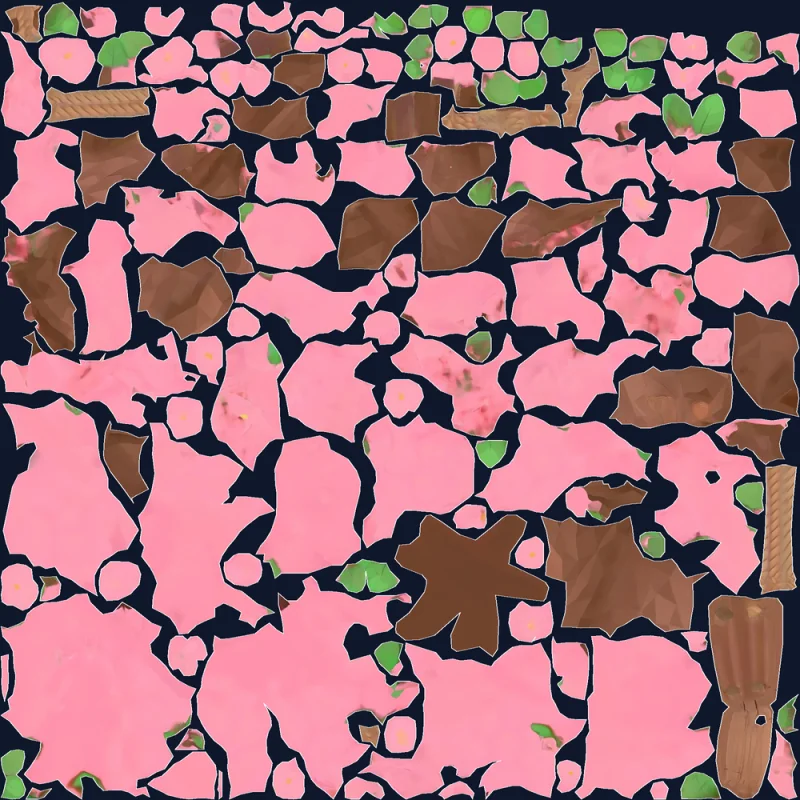
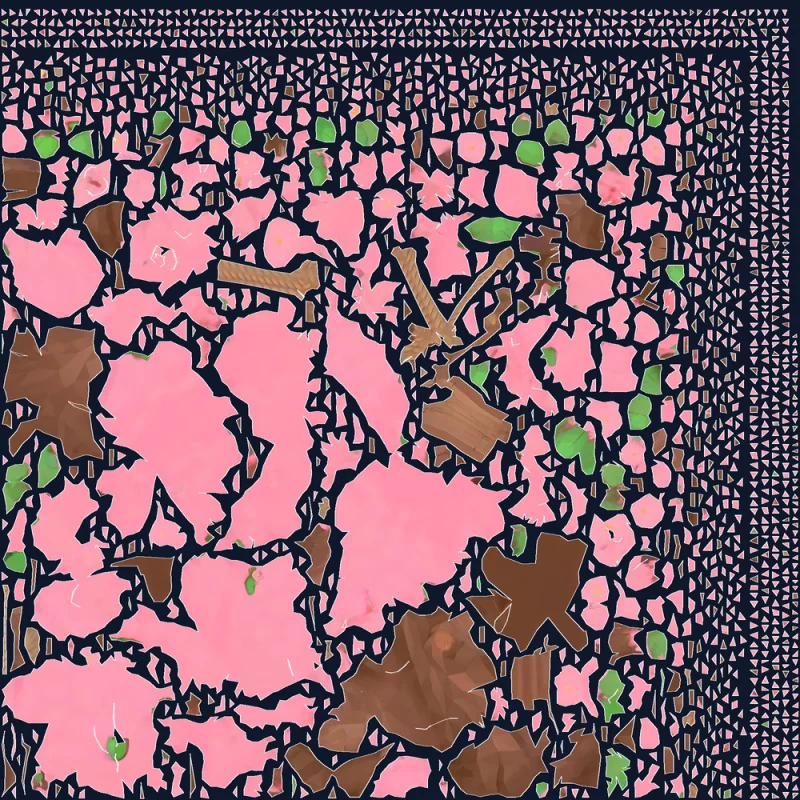
Blossom tree — A model full of blossoms and leaves shows the engines' differences. PB Unwrap had the fewest islands (113) and Tripo Unwrap was clean too, while Meshy Unwrap piled tiny fragments into a band along the top and right edges of the sheet, ending up with 1,771 islands.
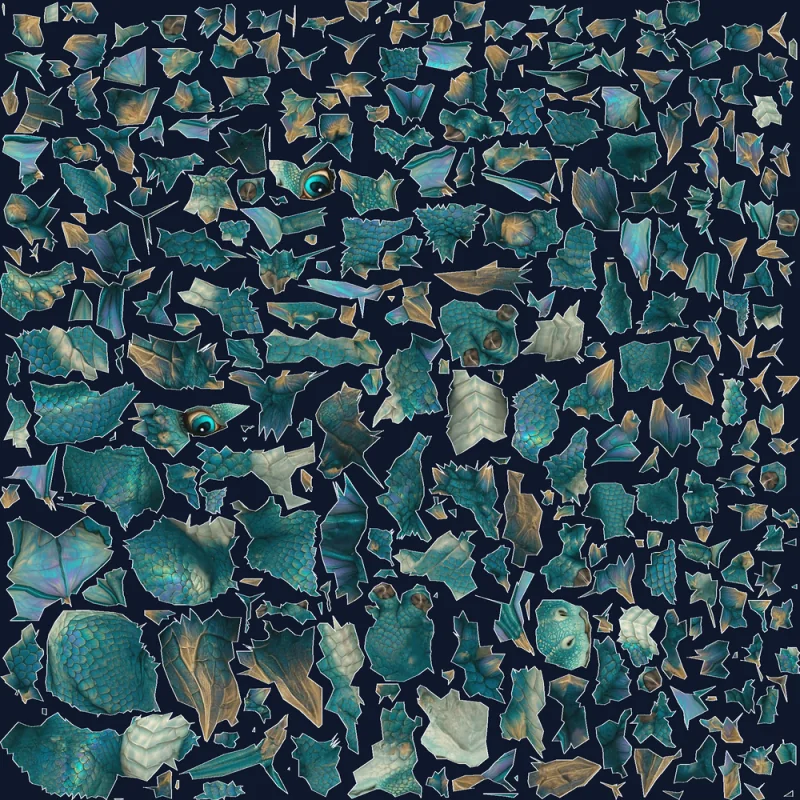
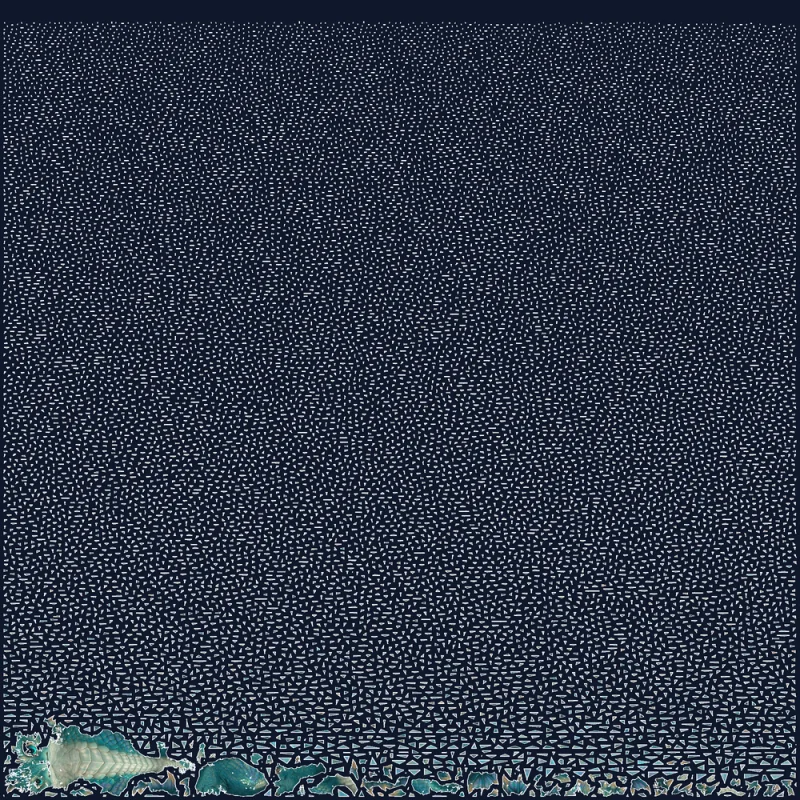
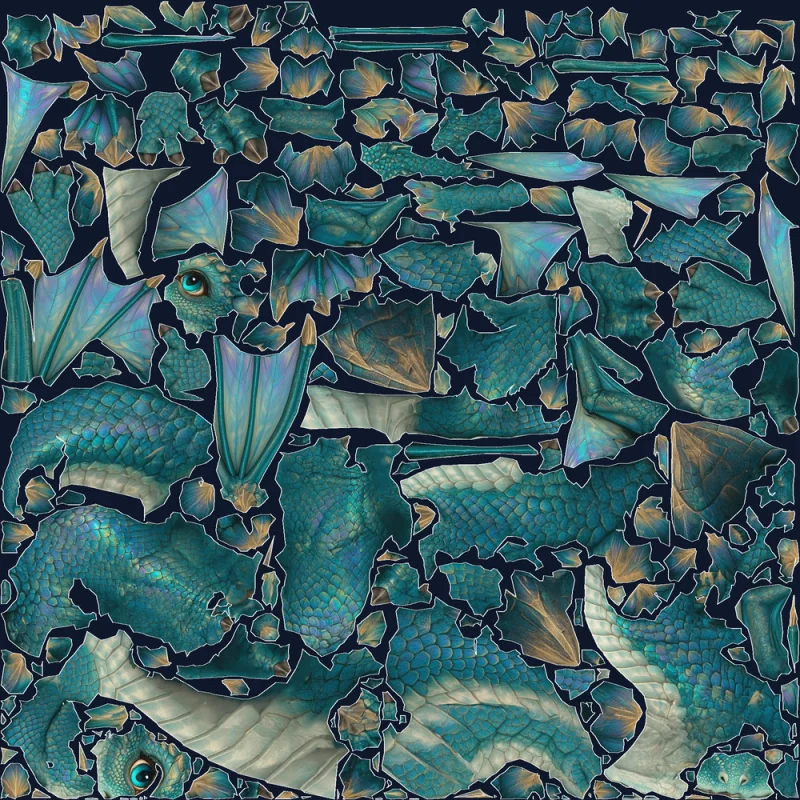
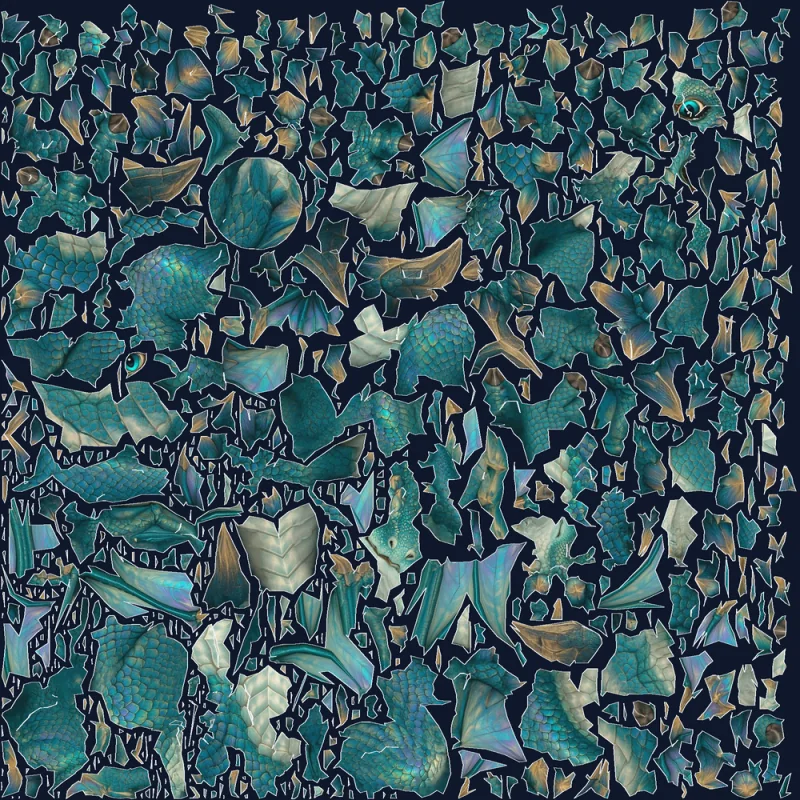
Baby dragon — On a detailed model the gap is widest. Tripo Unwrap laid the body, tail and wings out in large islands with the scale pattern running unbroken (73% usage), and PB Unwrap and Meshy Unwrap also produced islands that carry the scale pattern. HY3 Unwrap broke almost everything outside one strip at the bottom of the sheet into tiny fragments.
Which engine to choose
- Start with PB Unwrap — at 10 credits it's the lowest-cost option, it leaves almost no fragments on most models, and it takes the widest range of models (fewer than 100,000 faces). For a model with a great many small parts, like coins, Tripo Unwrap does better.
- When UV layout quality matters most, use Tripo Unwrap — fewer islands and the tightest packing mean sharper textures at the same resolution, and it stayed reliable on detailed models. At 50,000 faces or more, bring the count down with Remesh first.
- When texture resolution has to be even across the model, use Meshy Unwrap — it has the smallest variation. It suits simpler shapes better than models with many small parts like foliage or ornaments.
- Keep HY3 Unwrap for low-poly models where you want large surfaces in one piece — it lays big surfaces like a body out large but leaves many small fragments around them, and on models with dense detail like scales or feathers it broke about 21–66% of the faces into tiny fragments. In this comparison, Tripo Unwrap, at the same 120 credits, came out ahead on most metrics.
What happens to the textures
- If the source has textures, the base color (Albedo) map — plus Roughness/Metallic and Normal maps when present — is re-baked onto the new UVs at 2K (2048px). This is the same for all four engines. Models with 4K or 8K textures come back at 2K too.
- A model without textures comes back with just the new UVs.
- The resulting mesh is triangulated. The exception: a quad model made with Tripo P2 and unwrapped with PB Unwrap keeps its quads, and only its base color map is re-baked.
After unwrapping
- Check the new layout — open the UV · texture viewer with the Texture button at the top of the 3D viewer and turn on Show UV to overlay the UV wireframe on the texture (desktop). See The 3D Viewer & Asset Info.
- Work in a DCC — export it, or send it over a Blender, Unreal, Godot, or Unity bridge, and paint on the clean UVs.
- Retexture — run a fresh Texture pass on the same layout.